Wave AI Note Taker & Recorder
Mohrer AssociatesProductivity
4.5234.00 Reviews
- Version
- Varies With Device
- Installs
- 100.00K
- Age Rating
- Everyone
Screenshots

Our Review of Wave AI Note Taker & Recorder
 Analysis by Appyee
I lose more meeting details when I’m trying to write them down than when I simply listen, and the same thing happens in lectures: a useful explanation can pass while I’m still catching up on the previous point. That recurring problem is why I’m interested in Wave AI Note Taker & Recorder. Its appeal is straightforward: start a recording with one tap, then use a transcript to revisit what was said instead of relying on hurried notes. In my view, the real test is whether that saves time without creating a new chore of sorting through recordings.
Where a recording fits into the workday
A voice note can be easy to make and surprisingly hard to use later. If I record a thought and leave it buried among unrelated clips, I still have to replay it to find the useful part. A transcript changes that trade-off: text can be scanned and searched, while the audio remains valuable when wording or context matters. That combination makes this more than a digital voice recorder, but it does not remove the need to review and organize what I capture.
I would use it when listening matters more than producing polished notes in real time: a planning conversation, a class explanation, or a spoken reminder that contains several details. It is less suited to a moment when I need to write a structured document as the conversation unfolds. Recording and transcribing can preserve material for later, but they do not automatically decide which points deserve action.
Getting Started with Wave AI Note Taker
First things first, downloading and setting up the app was a breeze. Available on both Android and iOS, the app doesn’t demand a lot of space, which is always a plus. Once I had it up and running, the sleek and intuitive interface immediately caught my eye. It’s got that minimalist vibe, which makes it easy to navigate without getting lost in a sea of features.
A useful first setup is really a note-taking habit
Before relying on any transcription tool, I’d decide how I plan to find things again. A simple naming habit—such as putting the project, class, or conversation topic in the note title—can make a bigger practical difference than recording everything indiscriminately. If I capture a meeting called “Monday planning” and later search for a decision, a clear label gives me a much better starting point than a pile of generic recordings.
I’d also test the workflow in a low-stakes situation before using it for an important conversation. Record a short voice memo, stop, and check whether the resulting text is easy for me to scan and understand. That small trial helps set realistic expectations for my speaking pace, room noise, and preferred level of detail. It also gives me a chance to learn how I want to organize notes before a busy day creates a backlog.
Recording and Transcribing
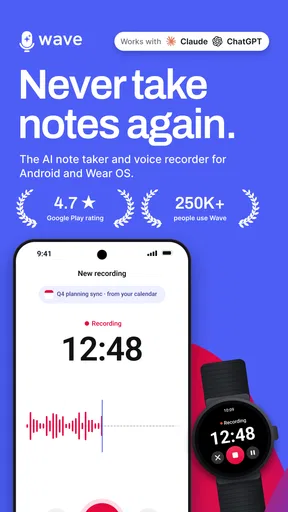
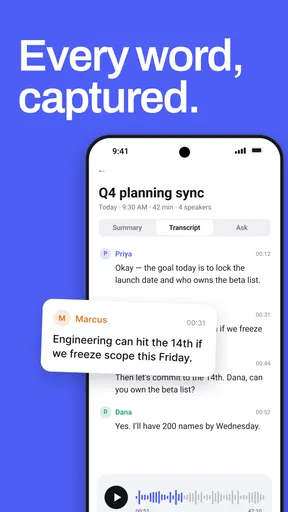
The main attraction here is the app’s ability to record and transcribe notes with impressive accuracy. I tested it during a few meetings and lectures, and let me tell you, it’s like having your own personal assistant. The app uses AI technology to transcribe audio in real-time, and it’s surprisingly good at picking up different accents and tones. No more frantic scribbling or fearing you’ll miss out on important details!
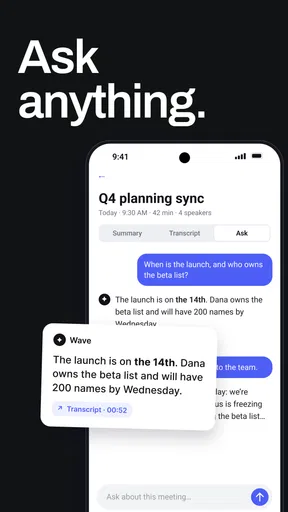
What’s cool is that it doesn’t just stop at transcription. You can search through your notes using keywords, which is super handy when you need to find something specific in a jiffy. The app also allows you to organize notes into folders, making it a dream for anyone who loves to keep things tidy.
Make the transcript useful, not just searchable
Keyword search works best when I treat a recording as a reference, not as a finished set of minutes. After a discussion, I’d look up a term I remember, revisit the surrounding passage, and turn the actual commitment into a short action note of my own. Search can help locate a detail, but it cannot judge whether a tentative idea became a firm decision or whether a speaker was joking. Listening back around the relevant passage is a sensible check before I share or act on it.
There is a practical trade-off in capturing more than I need. A long recording can preserve context that a hurried summary misses, but it can also leave me with more material to review. For recurring meetings, I’d reserve recordings for conversations where exact details or follow-up questions matter, rather than making every routine catch-up another file to process. That keeps the time saved at the start from turning into a review burden later.
Daily scenarios where it earns its place
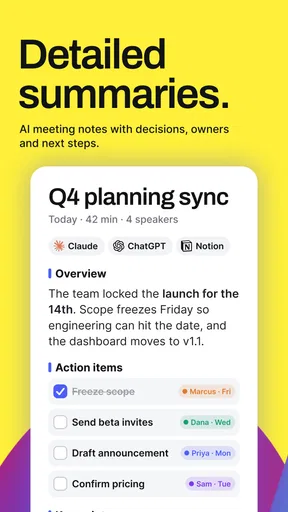
Imagine I leave a project meeting with three owners, a changed deadline, and one unresolved question. Instead of splitting my attention between the conversation and a notebook, I can focus on listening, then use the recording and transcript to check the names and details afterward. I would still write a concise follow-up message myself; the transcript is the evidence I consult, not a substitute for confirming the team’s actual commitments.
For a student, the same approach can help when an instructor explains a difficult idea faster than it can be copied down. The recording can be revisited during study, while keyword search may help locate a term from the lesson. I would not treat it as a reason to stop taking any notes at all: jotting down a question or marking the topic I found confusing gives the later review a purpose, instead of asking me to replay a whole lecture without direction.
Short voice memos are another sensible use. If an idea arrives while I’m walking between tasks, recording it may be easier than typing a long thought on a phone. Later, a text version can help me find the point without replaying every memo. This is especially useful when I capture a specific phrase or task, though a quick spoken note still needs enough context to make sense when I hear it again days later.
What it removes—and what it cannot
The main friction it can remove is the pressure to document every sentence as it happens. That matters in a conversation where eye contact and careful listening are more useful than looking down to write. It also gives me a way to revisit details I missed. But recording does not guarantee that every word will be transcribed perfectly; names, technical vocabulary, overlapping speech, and a noisy setting are all reasons to verify important passages against the audio rather than assume the text is definitive.
That distinction is important for sensitive or high-stakes conversations. I would not rely on an AI transcript alone for a legal, medical, or formal record, and I would make sure I have permission to record when the situation calls for it. A transcription can be a helpful personal reference, but it is not automatically an authoritative account or a replacement for careful human review.
How it compares with familiar alternatives
Compared with handwriting or typing notes as people talk, the app’s strength is that I can give more attention to the conversation and check details later. The cost of that convenience is a second step: review the transcript, correct anything important, and extract the actual decisions. A notebook remains better for a quick outline, diagrams, or selective thinking; it does not create a recording that I can search, but it also does not leave me with a long transcript to sift through.
Compared with a basic voice recorder, transcription and keyword search make it easier to locate a remembered point without listening from the beginning. A plain recorder can still be the better choice if all I need is audio and I do not want to manage text. And compared with a dedicated meeting-minutes workflow, Wave is more appealing as a capture tool than as a guarantee of finished, structured notes. The best choice depends on whether I need searchable source material or a ready-to-send summary.
Integration and Sharing
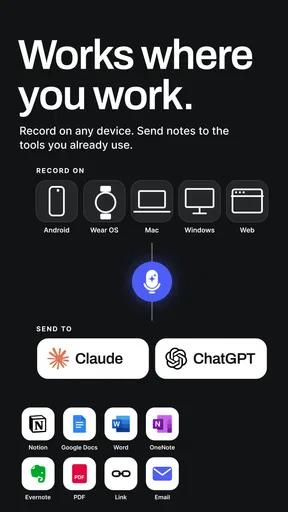
Now, let’s talk about integration. Wave AI Note Taker & Recorder plays nicely with other apps. You can easily sync your notes with cloud services like Google Drive or Dropbox, ensuring your data is safe and accessible from anywhere. Sharing notes with teammates or friends is just a couple of taps away, and the app lets you export notes in various formats, which is great when you need to send them to someone using a different platform.
Cost, fit, and a few sensible checks
The app is free to download, while in-app purchases range from $6.99 to $139.99 per item. I’d try the basic workflow first and decide whether I genuinely use recording, transcription, and retrieval often enough to justify any optional purchase. A person who only records the occasional reminder may not need to pay for more; someone who routinely revisits meetings or lectures may value a more capable workflow. The right decision depends on actual use, not on the idea that every note needs an upgrade.
Wave AI Note Taker is a productivity app from Mohrer Associates. It has a 4.6 average from around 2,100 ratings, and more than 100,000 installs. It is rated for Everyone, was released on March 15, 2024, and version 3.6.4 requires Android 8.0 or later. Those details make it easy to assess whether it fits a device and a general audience, but they do not answer the personal question that matters most: will I return to my transcripts often enough for them to save time?
I’d be cautious about using any recording app as a catch-all memory system. If I never name or revisit notes, even a searchable archive can become clutter. If I handle confidential discussions, I’d think carefully about consent and whether recording is appropriate before pressing the button. And if I need highly polished minutes, live collaboration, or a structured task list, I’d choose a tool built around those needs rather than expect a transcript to do that work for me.
Customization and User Experience
One of the things I love about this app is the level of customization it offers. You can tweak the settings to suit your preferences, whether it’s adjusting the playback speed or choosing different themes to match your style. The user experience is smooth, with no noticeable lags or crashes during my time using it.
For those who love shortcuts, there are plenty of them. You can set up voice commands to start or stop recordings, which is pretty nifty when you’re on the go. The app also supports multiple languages, broadening its appeal to a global audience.
Who should choose it, and who should pass
I’d recommend giving it a try if you regularly leave meetings or classes wishing you could check a phrase, a decision, or a detail you could not write down quickly enough. It is also a reasonable fit for people who think aloud and want to turn spoken reminders into something easier to search later. Its value is clearest when recording is followed by a small, consistent review habit.
I’d skip it if you prefer to keep no audio record, need a formal transcript without checking it, or want your notes automatically converted into polished minutes and assigned tasks. It may also be more process than a person needs if a short handwritten list already captures the important points. For me, the deciding factor is not how much it can record, but whether I can use the saved material without adding another neglected inbox to my day.
Final Thoughts
All in all, I’d say Wave AI Note Taker & Recorder is a solid choice for anyone looking to streamline their note-taking process. It’s packed with features that cater to both casual users and professionals who need a reliable tool to capture and organize their thoughts. While it’s not without its quirks, the overall experience is positive and definitely worth checking out if you’re in the market for a new note-taking app.
So, if you’re tired of losing track of important details during meetings or lectures, give this app a shot. It might just become your new best friend in the productivity department!
Verdict
Strengths of Wave AI Note Taker & Recorder
- Transcribes audio notes accurately.
- Supports multiple languages for notes.
- Integrates with popular cloud services.
- Easy-to-use interface for quick access.
- Offers offline functionality for recording.
Limitations of Wave AI Note Taker & Recorder
- Limited free version features.
- Occasional sync issues with cloud.
- Requires internet for full functionality.
- High battery consumption during use.
- No dark mode option available.
Similar Picks in This Category
View All
Google Calendar
Google LLC4.6

Google Drive
Google LLC4.3

Google Assistant
Google LLC3.9

Microsoft OneDrive
Microsoft Corporation4.6

Samsung Calendar
Samsung Electronics Co., Ltd.4.1

Microsoft OneNote: Save Notes
Microsoft Corporation4.6
Frequently Asked Questions
What is Wave AI Note Taker & Recorder?
Wave AI Note Taker & Recorder is an innovative app designed to help users effortlessly capture and organize their thoughts, meetings, and lectures. It uses advanced AI technology to transcribe audio recordings into text, making it easy to review and share notes. It's available for both Android and iOS platforms.
How does Wave AI Note Taker & Recorder work?
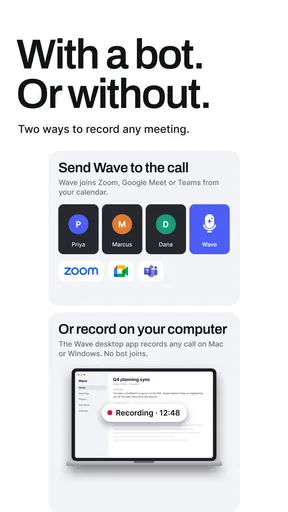
Wave AI Note Taker & Recorder works by recording audio during meetings or lectures and using AI to transcribe it into text in real-time. Users can organize these transcriptions, add highlights, and even search for specific terms. The app also allows for easy sharing of notes with colleagues or classmates.
What are the key features of Wave AI Note Taker & Recorder?
Key features include real-time audio transcription, easy organization of notes, keyword search, and the ability to highlight important sections. The app also supports sharing notes via email or other platforms, making collaboration straightforward and efficient. It's designed to be user-friendly for both personal and professional use.
Is Wave AI Note Taker & Recorder free to use?
Wave AI Note Taker & Recorder offers a free version with basic features, but there may be limitations on transcription length or storage. For more advanced features, such as unlimited transcriptions and cloud storage, users may need to subscribe to a premium plan. Pricing details are available on the app’s download page.
Is my data safe with Wave AI Note Taker & Recorder?
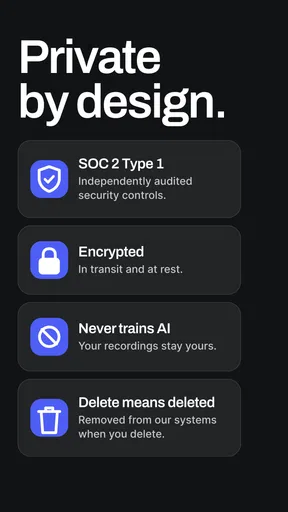
Yes, Wave AI Note Taker & Recorder prioritizes user privacy and data security. The app uses encryption to protect your recordings and transcriptions. Additionally, it complies with data protection regulations, ensuring that your information is handled with the utmost care. Always review the privacy policy for more details.
